

When I first started using Screaming Frog, I hit a wall. I could crawl public sites easily. But my client’s staging site? The one behind a login wall? It was a mystery. I couldn’t see the new pages. I couldn’t check for broken links. I felt stuck.
This is a common problem. You build a new site. You password-protect it to keep it safe from prying eyes. But then, you need to audit it. You need to find SEO issues before it goes live.
You need to know how to read a screaming frog crawl report for a password protected site. This guide is for you. It will show you exactly how to do it. We will move from confusion to confidence.
You don’t need to be a tech wizard. The Screaming Frog SEO Spider makes it possible. We will cover the basics, the key reports, and how to avoid common pitfalls.
Let’s start.
Why Crawl a Staging Site? Experience Matters
Imagine launching a new website. You are excited. But within hours, you see 404 errors. Your images are missing. Your meta descriptions are wrong. The site is live. Visitors see these issues. Your reputation takes a hit.
Crawling your staging site prevents this . It lets you catch errors early. It helps you find problems before your customers do. It saves you from embarrassment and lost sales.
I always run a crawl on the staging version. It is my final quality check. It finds broken links, missing titles, and redirect chains. Fixing these on a staging site is easy. Fixing them live is stressful.
Two Ways to Crawl a Login-Protected Site
The Screaming Frog SEO Spider handles password-protected sites in two ways. The method depends on how the site is locked down.
1: Standards-Based Authentication
This is the simpler method. You will see a pop-up window in your browser. It asks for a username and password. This is called Basic or Digest authentication.
Often, staging sites use this method. It is straightforward. Here is how to do it:
- Open Screaming Frog.
- Paste your staging site URL into the address bar.
- Click “Start.”
- A pop-up window will appear. It asks for your login details.
- Enter your username and password.
- The crawl continues automatically.
Screaming Frog handles this like a regular browser. It remembers your credentials for the session. No extra setup is needed. This feature works even without a license key .
2: Web Form Authentication
This is for more complex logins. You will see a full web page with a login form. You enter your details and click a “Login” button. This is common for WordPress sites with membership plugins.
To crawl these sites, you need a Screaming Frog license key. The paid version unlocks this feature.
Follow these steps:
- Go to Configuration > Authentication.
- Click the Forms Based tab.
- Click the Add button.
- Enter the login page URL. For a Shopify site, this is often your store URL. It will redirect to a password page .
- A built-in browser will open. It shows your login page .
- Log in just like a normal user.
- Click OK to save.
- Now, enter your root domain and start the crawl .
The tool uses your login session to crawl. It sees the site just like a logged-in user would.
The “Do Not Do This” Warning: Experience from a Real Test
This feature is powerful. You must handle it with care. The Screaming Frog team gives a strong warning . The tool clicks every link on a page. This includes links to log out, create posts, install plugins, or delete data.
Read Also: SEO Agency Interamplify: How They Command Global SERPs Across 36 Languages
The Screaming Frog team shared a story. They let the tool loose on a test site. They were logged in as an Administrator. In just 30 minutes, it installed a new theme. It installed 108 plugins. It activated 8 of them. It even deleted some posts.
Yes, you read that right. The tool can make changes to your site. It can break things.
How to Stay Safe: Expert Advice
You must be careful. Here are the rules I always follow:
- Use a Read-Only Account: This is the safest practice. Create a new user for Screaming Frog. Give it the lowest permissions. For WordPress, set its role to ‘Subscriber’. This user can view the site. It cannot change anything.
- Exclude Dangerous URLs: You can tell Screaming Frog to skip certain links. For a WordPress site, you should exclude the logout URL. You should also block the
wp-adminfolder. - Set Up Exclusions: Go to Configuration > Exclude. Add the URLs you want to avoid. This adds a safety net.
- Remember: You are using a tool that can change things. Double-check your settings. Proceed with caution.
Understanding Your Crawl Report: What to Look For?
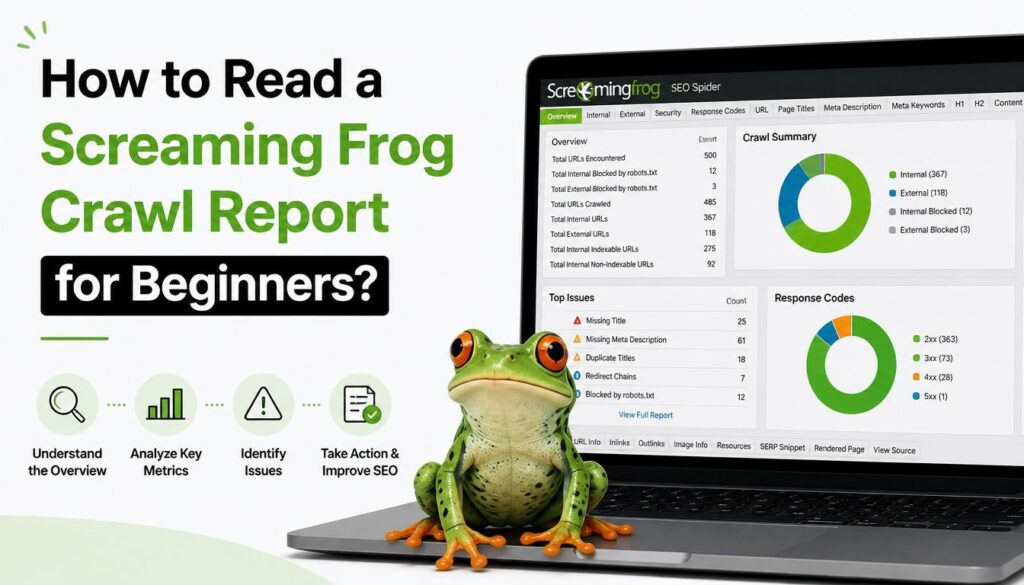
Now you have logged in. You have run the crawl. You have a report. What do you do with it? The interface can seem busy. Focus on the key areas.
The “Issues” Tab: Your Starting Point
The Issues tab is your best friend. It lists all the errors, warnings, and opportunities. It is colour-coded for quick scanning.
- Red (Issues): These need fixing. Examples include broken links (404 errors) or missing meta descriptions.
- Orange (Warnings): These are potential problems. They might not be critical. But you should check them.
- Green (Opportunities): These are suggestions. They can help improve your site’s performance.
Start with the red items. Fix those first. Then, move to the orange warnings.
The Response Codes Tab: Finding Broken Links
The Response Codes tab shows the HTTP status of every URL. This is where you find broken links. Look for 404 Not Found errors. These links lead to pages that do not exist.
You should also look for 301 and 302 redirects. Too many redirects can slow down your site. It can also confuse search engines.
The “Internal” Tab: Checking Your Site Structure
Click the Internal tab. This shows the structure of your site.
Look for the Crawl Depth column. This tells you how many clicks it takes to get from your homepage to any page. Pages with a high number (like 5 or more) are buried deep. They are hard to find. You might want to link to them from more important pages.
You can also look at the Link Score. This is like an internal popularity contest. Pages with a low score need more internal links. Add links to help them get found.
Paid License vs. Free Version: What Do You Need?
You might be wondering about the [Screaming Frog license key]. The free version is great. But it has limits. You need to know which one is right for you.
The Free Version (Good for Small Sites)
The free version has one big limitation. It only crawls up to 500 URLs. This is fine for small sites. It is perfect for quick checks.
If your site has more than 500 pages, the free version won’t cut it. It will stop the crawl early. You will not see the full picture.
The Paid License (Essential for Real Work)
The paid license costs £199 per year. The price can be slightly less with discounts.
It offers several key benefits:
- Unlimited URLs: You can crawl sites of any size. This is necessary for most business websites.
- Web Form Authentication: You can crawl sites with complex logins. This is the feature we discussed earlier.
- JavaScript Rendering: Some modern sites use JavaScript to load content. The paid version can render this content. This helps you audit “single-page applications” (SPAs) and JavaScript-heavy sites .
- API Integrations: You can connect to Google Search Console and Google Analytics. This enriches your data.
My Take: The free version is a great tool to learn with. But if you are a professional, get the paid license. The return on investment is massive. It saves you time. It helps you find complex issues. It is a standard tool for SEO experts.
Final Thoughts: Crawl with Confidence
You don’t need to be afraid of password-protected sites. The Screaming Frog SEO Spider opens the door. It is a powerful tool. You just need to learn how to use it safely.
Use a read-only account. Be mindful of the “Forms Based” authentication. Check the “Issues” tab first.
Now, you have the knowledge. You know how to read a screaming frog crawl report. You can find and fix problems before they go live.
Take the first step. Download the tool. Test it on a small staging site. Experiment with the features. You will be amazed at what you find.
This is the key to launching a perfect site. A site that makes you proud.